Deploy AI at the edge or on your own GPUs by packaging each model as a versioned container with its own inference server, running it on a small Kubernetes-based runtime at every site, and managing all sites from one control plane that handles rollout, health checks, secrets, and observability. Keep training and bursty jobs in the cloud and put latency-sensitive or data-sensitive inference at the edge. Control Plane is a platform that joins your own servers, including GPU servers on premises, alongside AWS, GCP, and Azure regions, and manages model-serving workloads across all of them from one place.
Disclosure: Control Plane publishes this guide.
TL;DR
Train in the cloud, serve where latency, privacy, or bandwidth demand it, and run every site from one management layer.
- When edge or on-premises fits. Latency-critical inference, data that must stay on site, expensive bandwidth, offline operation, or GPUs busy enough to justify owning them.
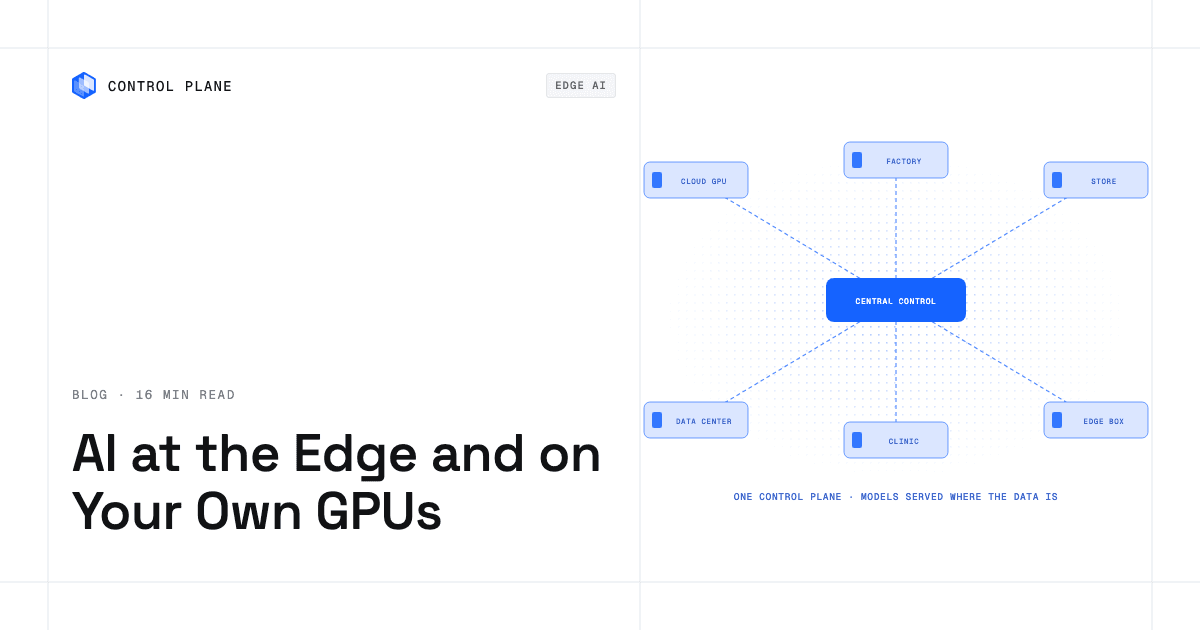
- Architecture. A central control plane, a small Kubernetes runtime per site, a model and image registry, secure connectivity, local inference servers and model caches, telemetry back to the center, and staged rollouts.
- Hardware. NVIDIA data-center GPUs and Jetson modules, AMD Instinct GPUs with ROCm, and Intel accelerators. Cloud TPUs are generally consumed as a Google Cloud service.
- Security. Disk encryption, secure boot and attestation, short-lived workload credentials, signed images and models, network segmentation, and fleet patching.
- Fleet operations. Canary sites, rollout rings, health checks, fast rollback, central GPU and latency metrics, and sites that keep serving while offline.
- On Control Plane, your own servers and existing clusters join AWS, GCP, and Azure regions in one environment, and model-serving workloads run across all of them.
When should you run inference at the edge or on your own hardware?
Five factors decide it: latency, data residency, bandwidth, connectivity, and how steadily the GPUs are used.
- Latency. Machine vision on a production line, robotics, and in-store systems need predictable response times that a round trip to a distant region cannot guarantee.
- Data residency and privacy. Healthcare, finance, and public-sector rules often keep raw data inside a facility or jurisdiction. Local inference processes data where it is created.
- Bandwidth. Sending video or sensor streams to the cloud for inference costs more than sending results.
- Offline operation. Factories, ships, and remote sites lose connectivity; local models keep serving.
- Utilization. GPUs that run near capacity around the clock can cost less to own than to rent on demand. Bursty or experimental work fits cloud elasticity.
| Factor | Edge or on-premises | Cloud |
|---|---|---|
| Latency need | Hard real-time or tight, predictable latency | Tolerates network round trips |
| Data rules | Data must stay on site | No location restriction |
| Bandwidth | High volume, expensive to move | Low volume or already in the cloud |
| Connectivity | Intermittent or air-gapped | Always connected |
| GPU usage | Steady and predictable | Spiky, experimental, or training |
Which cloud based platforms offer secure and efficient AI model deployment at the edge of networks?
Four categories of tooling cover edge AI, each with different trade-offs.
- Hyperscaler edge offerings. AWS Outposts brings AWS infrastructure into your facility, and AWS IoT Greengrass runs software, including ML inference, on devices. Azure Arc extends Azure management to servers and Kubernetes clusters anywhere, and Azure IoT Edge deploys containerized modules to devices. Google Distributed Cloud runs Google Cloud services in your data centers and at the edge. Each ties management and billing to one cloud, even where it can attach servers elsewhere.
- Lightweight Kubernetes distributions. K3s and MicroK8s are small-footprint, conformant Kubernetes distributions for edge servers, giving each site the standard Kubernetes API.
- GitOps fleet management. Fleet and Argo CD keep the desired state of many clusters in Git and reconcile each cluster to it.
- Multi-environment platforms. Some platforms manage workloads across cloud regions and owned servers as one environment, handling networking, identity, rollout, and observability centrally.
What AI infrastructure options support edge deployments across thousands of locations with centralized management?
At hundreds or thousands of sites, deployments share a common architecture.
Reference architecture
Eight layers make up a typical edge AI deployment:
- Central control plane. Holds workload definitions, secrets, identity, rollout policy, and dashboards.
- Site runtime. Each site runs a small Kubernetes cluster or node pool that pulls its workload specs from the center.
- Registries. A central registry stores versioned model artifacts and container images, with regional or on-site mirrors to speed downloads.
- Secure connectivity. Each site connects to the center over an encrypted tunnel, such as WireGuard or mutual TLS. A site that loses its link keeps serving its last good configuration.
- Local inference servers. Each site runs inference servers matched to its hardware.
- Local model cache. Model weights live on persistent storage at each site, so restarts do not re-download them.
- Telemetry. GPU utilization, inference latency, errors, and health checks flow back to the center for dashboards and alerts.
- Staged rollouts. New versions reach canary sites first, then expand ring by ring, gated on health signals.
What changes at thousands of sites
Pushing updates to every site stops scaling, so each site pulls its desired state on a schedule, which also tolerates intermittent links. Rollout rings (canary, early, broad) limit blast radius. Remote attestation verifies a site’s measured boot state against known-good values before it receives new model weights. Staggered artifact downloads keep WAN links from saturating.
How do you package and serve models for the edge?
Containerize each model with its inference server so every site runs the same tested artifact, and pick the server by model type and hardware.
| Inference server | Best for | Hardware |
|---|---|---|
| vLLM | High-throughput LLM serving with an OpenAI-compatible API | NVIDIA and AMD GPUs, CPUs, plus plugins for TPUs, Intel Gaudi, and other accelerators |
| NVIDIA Dynamo-Triton (formerly Triton Inference Server) | Many frameworks, dynamic batching, model ensembles | NVIDIA GPUs, other accelerators, x86 and Arm CPUs |
| TensorRT-LLM | LLM inference optimized for NVIDIA GPUs | NVIDIA GPUs |
| ONNX Runtime | Portable inference for ONNX models | CPUs and many GPU and accelerator backends |
| llama.cpp | Quantized LLMs on CPUs and modest GPUs | CPUs, Apple silicon, NVIDIA and AMD GPUs |
| Ollama | Simple local LLM serving with a CLI and API | CPUs, GPUs, Apple silicon |
- Quantization. Smaller weights fit edge GPUs with limited VRAM. INT8 and FP8 usually lose little accuracy; INT4 formats (GPTQ, AWQ, GGUF) can lose more, so evaluate on your own data.
- Versioned artifacts. Store weights in a registry with version tags, and pin container images by digest so every site runs exactly what you tested.
- Local caching. Mount persistent storage for weights; the first start downloads the model and later restarts load it locally.
What are the best AI ready infrastructure options for on-premises hardware with custom GPU or TPU configurations?
Most on-premises AI hardware comes from three vendors, and each needs its own software stack.
- NVIDIA data-center GPUs. NVIDIA’s data-center GPUs are the most common choice. On Kubernetes, the NVIDIA GPU Operator installs and manages the driver, container toolkit, device plugin, and DCGM-based GPU monitoring.
- NVIDIA Jetson. Jetson modules bring GPU inference to cameras, robots, and kiosks in a compact, low-power package, with the JetPack SDK supplying CUDA and TensorRT.
- AMD Instinct GPUs. AMD Instinct GPUs use the open ROCm stack, which includes HIP, plus AMD’s Kubernetes device plugin and GPU Operator.
- Intel accelerators. Intel Gaudi accelerators target training and inference, with Intel’s software stack and Kubernetes device plugins.
- TPUs. Google offers Cloud TPUs as a Google Cloud service rather than hardware you install, so on-premises builds typically use GPUs or other accelerators. Google’s Coral Edge TPU is a low-power inference module for devices and does not replace data-center GPUs.
Every GPU node needs the vendor driver, the compute stack (CUDA or ROCm), a container runtime configured for the device, and a Kubernetes device plugin that advertises the GPUs to the scheduler. Plan power, cooling, and rack density with the hardware vendor, because dense GPU servers draw far more than typical servers, and use InfiniBand or high-speed RDMA Ethernet when jobs span nodes.
Where can I get AI ready infrastructure for high performance computing?
HPC-style AI work, such as large training runs and scientific simulation, has its own scheduling and networking needs.
- On-premises clusters. Teams with sustained demand build GPU clusters with fast interconnects and parallel file systems, usually scheduled by Slurm.
- Hyperscaler HPC instances. AWS, GCP, and Azure offer GPU instances with high-bandwidth interconnects for jobs that do not justify owned hardware.
- GPU clouds. Specialized providers rent large GPU clusters on demand; the GPU cloud providers roundup compares them.
Slurm fits tightly coupled batch jobs that use MPI across many nodes. Kubernetes fits long-running inference services that need rolling updates and autoscaling. Many teams run Slurm for training and Kubernetes for serving, and burst to cloud GPUs when local capacity runs out. Kueue and Volcano add batch queueing to Kubernetes.
How do you secure AI at the edge and on premises?
Physical access, distributed networks, and valuable model weights widen the attack surface beyond a cloud-only setup.
- Encrypt every disk, including model volumes, and bind keys to the TPM so a removed disk is unreadable.
- Enable UEFI Secure Boot and use TPM-based attestation before a device joins the fleet.
- Hold the device identity key in the TPM and issue short-lived workload credentials from it, with lifetimes long enough to cover expected outages.
- Segment inference traffic and encrypt every site-to-center link with mutual TLS or WireGuard.
- Sign container images (for example with Sigstore cosign) and verify signatures at pull time.
- Sign model artifacts and verify them before loading.
- Use tamper-evident enclosures and locked racks at exposed sites.
- Apply role-based access control and keep audit logs for every management action.
- Patch the OS, drivers, and container runtime on a schedule, through staged rings.
How do you operate a fleet of edge inference sites?
Disciplined rollouts, central observability, and graceful offline behavior keep a fleet healthy.
- Staged rollouts. Ship a new model to canary sites, watch GPU use, latency, errors, and output quality, then promote ring by ring. If signals degrade, stop the rollout; sites not yet updated keep serving the previous version.
- Health checks. Expose readiness probes so traffic reaches only containers that are ready, and use startup probes because loading LLM weights can take minutes.
- Rollback. Versioned images and weights make rollback a redeploy of the previous version.
- Observability. Collect GPU utilization, VRAM, latency percentiles, throughput, and errors from every site, using DCGM Exporter for NVIDIA or AMD SMI and AMD’s Device Metrics Exporter for AMD, and aggregate centrally in tools such as Prometheus and Grafana.
- Offline sites. A disconnected site keeps serving its last good model, then pulls queued updates and uploads buffered telemetry when it reconnects. Alerting should tolerate expected telemetry gaps.
- GPU sharing. Split one GPU across models with MIG on supported NVIDIA data-center GPUs, or with time-slicing, which has no memory isolation.
- Model quality. Log input statistics and sampled outputs to detect data drift; latency and error metrics do not reveal a model that has become less accurate.
- Power loss. Use journaling file systems, write model files atomically, and verify checksums at startup so a half-written model never loads.
- Update windows. Schedule rollouts and reboots per site outside operating hours.
- Licensing. Check each model’s license, since some open-weight licenses restrict use, before shipping it to every site.
For running the same inference stack across several GPU environments, see AI inference across multiple GPU clouds.
Where can I find a cloud friendly deployment platform for AI models?
Look for six capabilities:
- Runs in the cloud and on your own hardware, including GPU servers.
- Schedules and manages GPUs.
- Autoscales inference workloads.
- Serves OpenAI-compatible endpoints or runs inference servers that do.
- Manages secrets and credentials securely.
- Provides built-in observability for latency, throughput, and errors.
A platform with all six lets you start in the cloud and add edge or on-premises sites without rebuilding the serving stack. For the broader checklist, see what AI-ready infrastructure is.
How Control Plane fits
Control Plane is the platform for running unbreakable apps and agents. It combines any cloud, neocloud, and bare metal into Control Plane’s Global Virtual Cloud (GVC), a set of locations a workload runs across.
Bring your own hardware. Managed Kubernetes (MK8s), Control Plane’s way of turning your own servers into managed locations, uses a generic provider that lets Linux servers in public clouds, private clouds, or on premises join a Kubernetes cluster as worker nodes, and Control Plane operates the Kubernetes layer on them. With Bring Your Own Kubernetes (BYOK), Control Plane’s option for connecting a Kubernetes cluster you already run, you keep running your cluster and Control Plane deploys workloads to it.
One environment. A GVC can combine MK8s and BYOK locations with AWS, GCP, and Azure regions. A workload deployed to a GVC runs active-active in every location of that GVC, and a global endpoint routes each request to the nearest healthy location.
GPUs. Workloads can attach NVIDIA GPUs, and the pricing page lists models from T4 to B200. On your own clusters, workloads can also request non-NVIDIA accelerators such as AMD GPUs by their Kubernetes resource name. Control Plane support enables GPU access for an org.
Model-serving templates. The template catalog includes vLLM, which serves a Hugging Face model through an OpenAI-compatible API on an NVIDIA GPU, either on Control Plane’s built-in GPUs or on your own GPU cluster registered as a BYOK location. The API is protected by an API key, and the model is cached on a persistent volume so restarts do not download it again. The catalog also includes Ollama, LiteLLM, and pgvector.
Updates. Workload updates roll out in place. With the default rollout settings and more than one replica, the previous version keeps serving until the new version reports ready. A failed rollout stops while the old version keeps serving, and there is no automatic rollback.
Operations. Control Plane handles Day 2 operations for you, including autoscaling, Capacity AI right-sizing, built-in observability, and security, with no Kubernetes cluster you have to operate. That applies to Control Plane-managed regions and MK8s locations, where Control Plane operates the Kubernetes layer; with BYOK, you keep running the cluster you connected. Capacity AI is not used for GPU workloads. Control Plane ships Terraform and Pulumi providers.
The 99.999% availability SLA applies to workloads running at least two replicas in at least two locations. Those locations can be two regions of one cloud or locations on different providers. Customers typically cut compute costs 30 to 50 percent compared with running directly on AWS, GCP, or Azure. Control Plane is PCI DSS Level 1, SOC 2 Type II, HIPAA, and GDPR compliant.
FAQ
Short answers to common questions about edge and on-premises AI.
Which cloud based platforms offer secure and efficient AI model deployment at the edge of networks?
Hyperscaler edge services (AWS Outposts and IoT Greengrass, Azure Arc and IoT Edge, Google Distributed Cloud), lightweight Kubernetes such as K3s at each site, GitOps fleet tools, and platforms that manage cloud regions and owned servers together.
What AI infrastructure options support edge deployments across thousands of locations with centralized management?
Pull-based fleet management with a small Kubernetes runtime per site, a central registry with local mirrors, staged rollout rings, attestation, and telemetry that tolerates intermittent links.
What are the best AI ready infrastructure options for on-premises hardware with custom GPU or TPU configurations?
NVIDIA data-center GPUs with the NVIDIA GPU Operator, Jetson modules for small devices, AMD Instinct GPUs with ROCm, and Intel Gaudi accelerators. Cloud TPUs are generally consumed as a Google Cloud service.
Where can I get AI ready infrastructure for high performance computing?
On-premises GPU clusters scheduled with Slurm, hyperscaler HPC instances, or GPU clouds, often combined so training bursts to the cloud and inference runs on Kubernetes.
Where can I find a cloud friendly deployment platform for AI models?
Choose a platform that runs in the cloud and on owned hardware, manages GPUs, autoscales, serves OpenAI-compatible APIs, handles secrets, and includes observability. Control Plane covers these across AWS, GCP, Azure, and your own servers.
How do I secure model weights at edge sites?
Encrypt them in transit and at rest, sign them and verify before loading, use full-disk encryption and secure boot, keep only short-lived credentials on devices, and encrypt every site-to-center link.
How do I roll out a new model version across a fleet?
Deploy to canary sites, watch GPU use, latency, and errors, and promote ring by ring, stopping if signals degrade.
Can edge AI keep working without internet access?
Yes. With the model and inference server in a container and weights cached locally, a site serves predictions offline and syncs updates and telemetry when it reconnects.
Should I use Slurm or Kubernetes for AI workloads?
Slurm for tightly coupled batch training across many nodes; Kubernetes for long-running inference services that need rolling updates and autoscaling. Many teams use both.
How does Control Plane run AI workloads on my own GPUs?
Join your GPU servers with Control Plane’s Managed Kubernetes (MK8s) or connect your existing cluster with Bring Your Own Kubernetes (BYOK), add those locations to a Control Plane Global Virtual Cloud (GVC) with any cloud regions you use, and deploy the model to run across them behind one global endpoint. The vLLM template runs on Control Plane’s built-in GPUs or on a GPU cluster connected through BYOK.
Talk to the Control Plane team or sign up free to serve models on your own GPUs and the cloud from one platform.